BOLT x ELECTRA
Registration & Activation
Fill out the registration form available at: rideswithbolt.eu.typeform.com/to/eGZkBFM2
Use the phone number registered on your Bolt Driver account and provide your Bolt referral code:
this code contains the information about your Bolt Rewards status and determines your preferential tariff at Electra. Without this code, your tariff cannot be applied correctly.
You will receive a confirmation SMS once your account is activated.
If you already have an account, you do not need to fill out the form again.
Yes, this is normal. If you already have an Electra account, you will not receive an activation SMS. Simply download the Electra app, log in with your phone number and select the “BOLT FRANCE” account to activate your preferential tariff.
Once registered:
- Open the Electra app on your phone
- Log in with your phone number
- From the home page of the Electra app, select “BOLT FRANCE” from the list of accounts
This step is what activates your preferential tariff. Without this selection, you will be charged at the public rate.
If your Electra app shows “PERSONAL” as the active account, your preferential tariff is not being applied. You must manually switch to the “BOLT FRANCE” account:
- From the home page of the Electra app, open the account selection menu at the bottom left of the screen
- Select “BOLT FRANCE” instead of “PERSONAL”
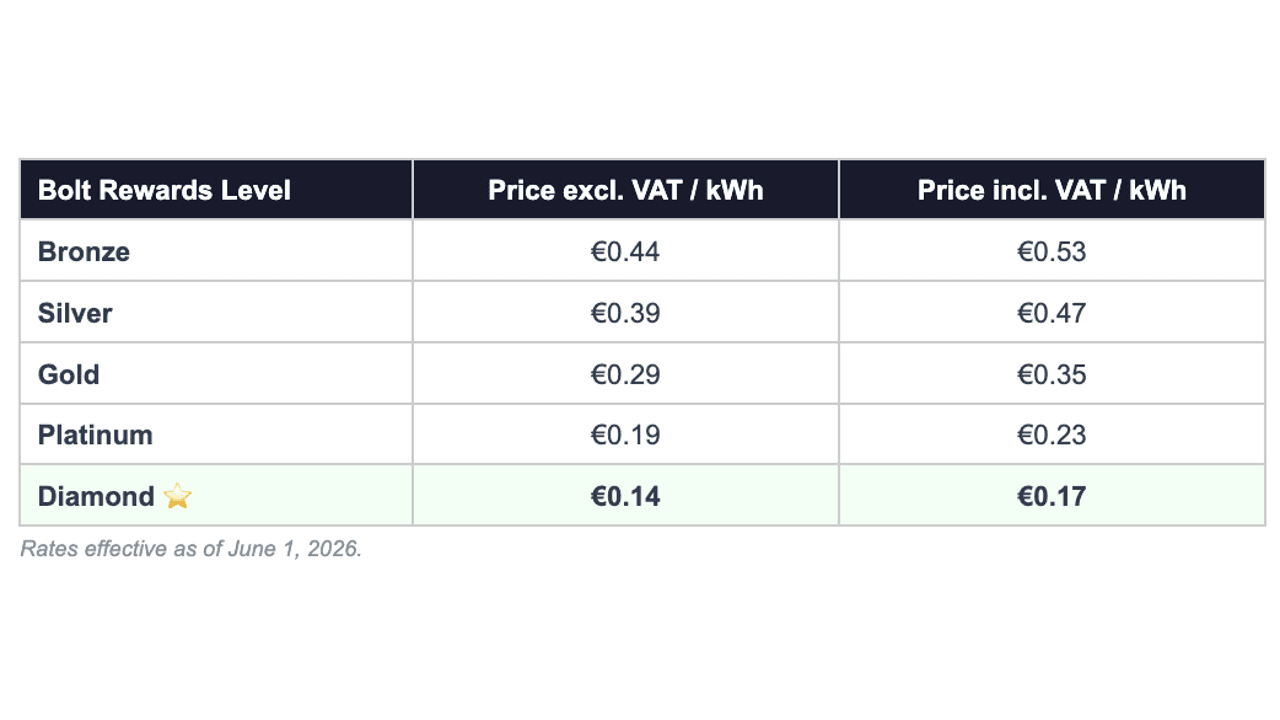
- Check that the displayed tariff matches your Bolt Rewards level
Contact Bolt support via the app, specifying your old and new number. The team will update your information with Electra.
No. There is no Electra promo code. The preferential tariff is activated only by selecting the “BOLT FRANCE” account in the Electra app. If an agent offers you a code, ignore this information: no promotional code is required.
Tariffs & Levels
Several possible reasons:
• You haven’t selected “BOLT FRANCE” in the Electra app → From the home page of the Electra app, open the account selection menu at the bottom left of the screen and select it.
• You have an active personal Electra subscription. The subscription tariffs always take priority, which is why it must be deactivated to benefit from your Bolt Rewards tariffs.
To cancel it:
- Select the ELECTRA+ tab in the app. The subscription configuration page will open.
- Then click on Cancel my ELECTRA+ tariff at the bottom of the page. Once the cancellation is completed, a confirmation will be sent to the email address linked to the Electra account.
When canceling the subscription, it remains active until the end of the current billing period. Example: By subscribing on November 26, 2024 and canceling your subscription on January 14, 2025, your benefits will remain active until January 26, 2025.
• The update is not yet effective → Levels are synchronized on business days, please wait 24 to 48 hours
Tariffs are updated automatically every day, except weekends and public holidays. If you change status on a Friday evening or during a public holiday, your new tariff will be applied on the next business day.
Note: the update is no longer weekly (on Mondays). It now happens daily on business days. If after 48 business hours your tariff is still not up to date, contact Bolt support via the app.
Charging & Usage
Yes. The limit is 1,700 kWh per month per driver. Beyond this limit, your Bolt France partner account is suspended until the 1st of the following month.
If you have exceeded the monthly limit of 1,700 kWh:
- Your “BOLT FRANCE” account is suspended for the rest of the month
- You can still charge at Electra stations at the public rate with your personal account
- Your partner account is automatically reactivated on the 1st of the following month
No. This is strictly forbidden. The rule is clear: 1 driver = 1 account. Any account sharing results in the definitive and irreversible removal of your access to the Bolt x Electra preferential tariff.
Billing & Account Deletion
Your invoices are available directly in the Electra app, in the charging history section. These invoices are issued by Electra, not by Bolt. For any specific request (professional invoice with VAT number, correction), contact Electra at: [email protected]
Contact Electra directly at: [email protected] Deleting your Electra account does not affect your Bolt Driver account or your Bolt Rewards level.
Make money driving with Bolt
Become a Bolt driver, set your schedule and earn money by driving!
Be your own boss. Start driving and earning!
