Criminal Record Checks (CRCs)
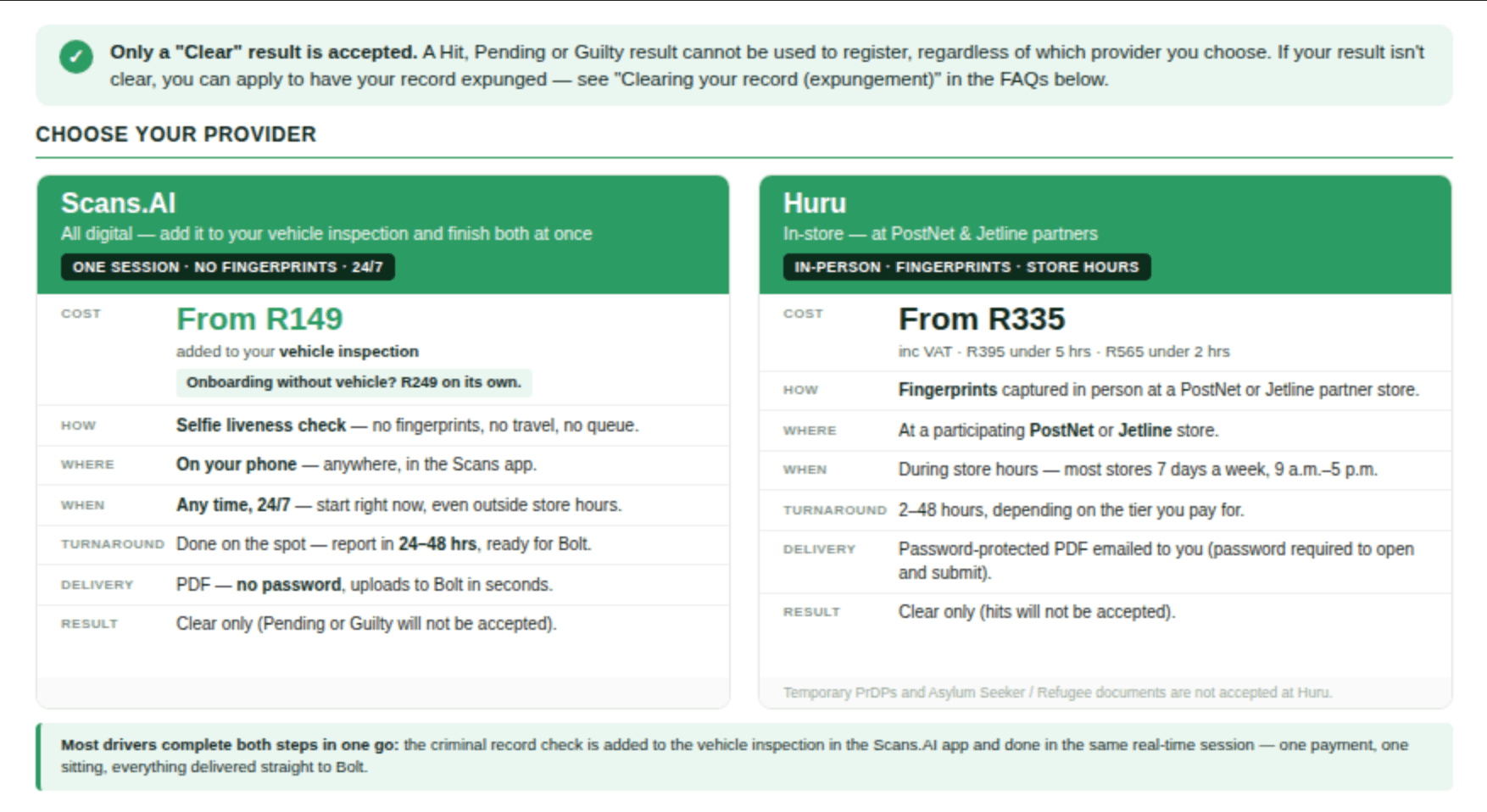
Every Bolt operator needs a clear criminal record to drive. Bolt accepts Criminal Record Checks (CRCs) from two approved providers: Scans.AI and Huru. Choose Scans.AI to complete your check on your phone, or visit a Huru partner store for a fingerprint-based check.
What is a Criminal Record Check?
A Criminal Record Check (CRC) is a documented record of a person's criminal convictions and pending cases. It's a required part of the Bolt registration process and helps us verify your identity and keep the platform safe. Bolt accepts a CRC from either approved provider, and only a Clear result is accepted for registration or document renewal.
Complete your check with Scans.AI
Add your background check to your vehicle inspection for just R149 extra — one session, one payment. A standalone CRC costs R249.
Scans.AI (previously CarScan) lets you complete your criminal record check on your phone, with a guided selfie identity check instead of fingerprints. No store visit is needed, and your results are delivered digitally.
Step 1: Open Scans.AI on your phone
Go to the Scans.AI Driver Portal in your browser.
Step 2: Select your vehicle type
Choose Car or Bike. If you do not have a vehicle, choose "Onboard without a Vehicle" to complete the CRC on its own.
Step 3: Add the background check
Under Optional Add-ons, select Background Verification. It costs R149 extra with your vehicle inspection.
Step 4: Answer the citizenship question
Select the option that applies to you.
Step 5: Continue and pay
Review the total shown before you pay.
Step 6: Complete your check
Complete your vehicle inspection, if you selected one, then take a short guided selfie in good lighting to verify your identity. No fingerprints are needed.
Step 7: Get your report
Your report arrives within 24–48 hours. Upload it to the Bolt Driver app — the report opens without a password. Use your PrDP expiry date as the CRC expiry date.
Huru (in-store)
Huru offers in-person assistance and a fingerprint-based criminal record check at participating PostNet or Jetline stores. Prices range from R335 to R565. Both Huru and Scans.AI are approved by Bolt — choose the option that suits you.
Step 1: Visit a partner store
Visit a participating PostNet or Jetline store with your payment and ID document. Check your chosen store's opening hours before you travel.
Step 2: Have your fingerprints captured
Store staff capture your fingerprints in person at the counter.
Step 3: Receive your CRC by email
Your report arrives as a password-protected PDF. The turnaround time depends on the service tier you choose.
Step 4: Unlock the PDF and upload it to Bolt
Use your date of birth in YYYYMMDD format to open the PDF. For example, 5 February 1986 becomes 19860205. Upload it at Step 5 of sign-up and use your PrDP expiry date as the CRC expiry date.
Huru pricing (including VAT)
- R335 — 24–48 hours.
- R395 — under 5 hours.
- R565 — under 2 hours.
What to bring
- Payment by debit card, credit card or cash.
- For South African drivers: an RSA ID card, green ID book or RSA driver's licence with PrDP.
- For foreign nationals visiting PostNet: your foreign passport.
Huru does not accept temporary PrDPs or asylum seeker/refugee papers. Bolt accepts temporary PrDPs, but this does not change Huru's document requirements for a CRC.
How long your CRC lasts — both providers
- Your CRC is valid until your PrDP expires, up to a maximum of 24 months.
- Submit your CRC within 12 months of its issue date.
- Use your PrDP expiry date as the CRC expiry date when uploading.
Only a Clear result from either approved provider is accepted.
CRC FAQ
Bolt accepts a Clear CRC from Scans.AI or Huru. Submit your report within 12 months of its issue date.
- Open the Bolt Driver app and go to your Documents section, or upload your CRC at Step 5 of sign-up.
- Select Criminal Record Check.
- Upload your PDF report. Scans.AI reports open without a password. For Huru, first unlock the PDF using your date of birth in YYYYMMDD format (for example, 5 February 1986 becomes 19860205).
- Use your PrDP expiry date as the CRC expiry date. A CRC is valid until your PrDP expires, up to 24 months.
- Submit — you will see a "Pending Review" status while our team verifies it.
- You will be notified once it is approved or if you need to resubmit.
A CRC will come back with one of three outcomes:
Clear: No criminal convictions found. Conviction Recorded: A matching conviction was found on the SAPS database. Inconclusive: The search couldn't be completed or confirmed.
Your Police Clearance Certificate itself lists the specific offence(s) and sentence(s) recorded against you. If you're unsure or the certificate is unclear, you can request more detail at the SAPS Criminal Record Centre where it was issued.
Depending on the offence and how long ago it happened, you may be able to apply to have it expunged (permanently removed from the database). See the Expungement section below for eligibility.
Visit your local police station.
- Provide your contact details and a certified copy of your identification document: ID doc (for ZA citizens) or passport (for Foreign nationals) - bring original along too.
- Fill out the SAPS 91(a) application form. See here for how to complete this form.
- Pay the required fee at the police station - the current prescribed fee is R170,00 per application (note: this is subject to change)
- Undergo fingerprinting for a background check.
- Wait for processing, which can take several weeks.
- You will receive an sms to monitor the progress of your application.
- acknowledging receipt of the application with a reference number
- a follow-up sms will be sent upon completion of the application.
- intermittent updates can be obtained on the SAP’s website while the application is being processed.
- Return to the police station to collect your certificate. Proof of identity must be presented when the certificate is collected.
You may qualify for expungement if, per the Criminal Procedure Act, 1977:
At least 10 years have passed since your conviction (5 years if you were 18 or younger at the time)You received a qualifying sentence (e.g. a fine, suspended sentence, correctional supervision — not direct imprisonment without the option of a fine) You haven't been convicted of another offence carrying imprisonment without the option of a fine during that period You're not on the National Sex Offenders Register or Child Protection Register (or you've had your name removed)
Make money driving with Bolt
Become a Bolt driver, set your schedule and earn money by driving!
Be your own boss. Start driving and earning!
